Notes

Blog

Plain notes on custom AI tools, automation, and building software for small and medium businesses.

Before and after, to the same time scale: the old way filled hours, the new way is about five times faster Two bars over the same span of time. The before bar is full - five manual steps (by hand, manual docs, spreadsheet, meeting, write-up) filling hours. The after bar fills only a fifth of that length - a short solid cobalt segment of minutes - and the remaining four-fifths is marked roughly five times faster. BEFORE - THE OLD WAY ≈ HOURS By handManual docsSpreadsheetMeetingWrite-up AFTER - WITH THE TOOLS 5x faster minutes - capture · prioritise · build · review
Drawn to the same time scale: the old loop filled hours of manual steps; the tools do the same job in the cobalt sliver - about five times faster.
6 min read

How two custom tools made our feedback loop 5x faster

Building MyPhysio with two people, two custom tools took the loop from feedback to fix - from hours of notes, docs and meetings down to minutes. Each built in under a day.

Read →
A gate on the work: multi-file, verifiable work goes to the agent; one-liners and taste calls stay in your hands A WORK box flows into a diamond asking multi-file and verifiable?; yes leads to a cobalt AGENT oval, no leads to a YOU box. WORKMULTI-FILE +VERIFIABLE?yesAGENTnoYOU
The agent earns big, checkable work; quick edits and judgment calls are still faster by hand.
6 min

When to reach for Claude Code, and when not to

An AI coding agent is a power tool - excellent for some jobs and the wrong choice for others, and knowing the difference is most of the skill.

AI developmentClaude CodeDeveloper tools
For some tasks the do-it-yourself bar is shorter than the AI bar once prompting, reviewing and fixing are counted Two horizontal time bars. BY HAND is one short solid bar. WITH AI is longer, split into prompt, wait, review, and fix segments. BY HANDWITH AIpromptwaitreviewfix + reprompt
The honest clock includes prompting, waiting, reviewing and re-prompting - sometimes your hands win.
5 min

When AI makes you slower

Reaching for the coding agent is not free, and knowing the handful of cases where it costs more than doing the thing yourself is the real skill.

AI developmentDeveloper toolsSoftware craft
AI produces a wide stream of possible builds; a narrow taste gate decides the few worth shipping Many parallel lines enter from the left, narrow into a cobalt gate labelled TASTE, and a single strong line exits to SHIPPED. everything AI can buildTASTESHIPPED
Production is cheap now. Deciding what deserves to exist is the scarce skill.
5 min

When AI can build anything, taste is the bottleneck

When generating code is cheap, the hard part stops being building and becomes knowing what to build, what good looks like, and when to stop.

AI developmentProductSoftware craft
One rough first build, two roads to the version you keep: rebuild from zero carrying the lessons, or deconstruct and prune down to the best parts Left: BUILD 1, a dashed container of many feature blocks - three good ones in cobalt among neutral ones. The flow forks. Road A: distil requirements, then a clean cobalt BUILD 2 from zero. Road B: strike out the unneeded blocks one by one and keep the best parts. Both roads end at the tool you keep. BUILD 1 · MOSTLY THERE many features · a few great ROAD A · REBUILD FROM ZERO REQUIREMENTS lessons BUILD 2 clean, from nothing ROAD B · DECONSTRUCT + PRUNE delete in sequence · keep the best BEST PARTS trimmed, kept, tightened
One rough build, two roads to the keeper: rebuild from zero with the lessons, or prune down to the best parts. Which is better is the real question.
6 min

Should you build it twice?

Build one to learn, then choose - rebuild from zero with the lessons, or deconstruct the build into requirements and prune it down to the best parts.

AI developmentPrototypingSoftware delivery
A green-looking change with one dangerous line only visible in the diff A code diff panel: several neutral lines, a few added lines, and one line highlighted in cobalt with a flag - the one the vibe check misses. the linevibes miss
It ran, the demo worked, the tests are green - and line 14 still deletes the wrong rows. Read the diff.
5 min

Review the diff, not the vibe

AI writes plausible code fast, and plausible is not the same as correct - so read every line of the diff like a pull request from a very fast, very confident junior.

AI developmentCode reviewSoftware craft
The human owns the architecture layer; the agent fills in the code beneath it Top: three connected cobalt architecture blocks owned by YOU. Below: hatched code areas under each block, filled by the AGENT. YOU: the shapeDATA MODELBOUNDARIESCONTRACTSAGENT: the filling
Decide the data model, the boundaries and the contracts yourself - then let the agent type inside them.
6 min

Own the architecture, delegate the typing

The durable split between you and an AI agent is that you hold the architecture and the decisions while it writes the code, and the failure mode is letting it decide the shape of the system by accident.

AI developmentSoftware architectureSoftware craft
Known territory is small; unknown unknowns are the large field, and encoded skills cover part of it A large dashed field labelled what you don't know you don't know surrounds a small solid box labelled what you know; a cobalt panel labelled SKILL covers a slice of the field. WHAT YOU DON'T KNOW YOU DON'T KNOWWHAT YOUKNOWSKILLexpertise, encoded
You can't study your way out of every blind spot - encode the expert's questions and let the agent carry them.
6 min

You have to know what you don't know

AI will confidently write code in domains you cannot judge, so the real skill is spotting your own blind spots and handing the agent real expertise instead of letting it guess.

AI developmentClaude CodeSoftware craft
An AI codebase sprawls into scattered duplicates unless conventions keep it to a few aligned modules Left: many small boxes scattered at odd angles - sprawl. Right: four aligned modules inside a clear boundary, one in cobalt - the tended codebase. sprawltended
Same amount of code - the difference is boundaries, conventions, and regular pruning.
6 min

Keeping an AI-built codebase from rotting

AI writes code fast, which means it can make a mess just as fast - here is the discipline that keeps a codebase clean enough that the next hundred changes stay cheap.

AI developmentCode qualitySoftware craft
Defect bars: AI code without tests is highest; with a test harness it drops sharply Three vertical bars compare defects: human code, AI code without tests at 1.7x, and AI code with tests much lower, in cobalt. 1xhuman code~1.7x defectsAI, no testsdrops sharplyAI + tests
The studies agree on the direction: AI writes more defects per change - and a test harness is what claws it back.
6 min

Do automated tests actually make AI-built software better?

What the research says about testing and quality - and why code that ships faster and buggier, which is exactly what AI produces, makes the tests matter more, not less.

AI developmentTestingCode quality
The prompt is small; the context stack is the big input that determines the agent's output A small PROMPT box and a tall cobalt CONTEXT stack both feed an AGENT oval, which produces a GREAT OUTPUT box. PROMPTCLAUDE.md · rulesdocs · examplesskills · house styleCONTEXTAGENTOUTPUT YOUCAN SHIP
Same model, same prompt - the context stack is what separates a lost agent from a great one.
6 min

Context is the real product

The gap between a lost AI agent and a great one is almost entirely the context you feed it, not the cleverness of the prompt.

AI developmentClaude CodeSoftware craft
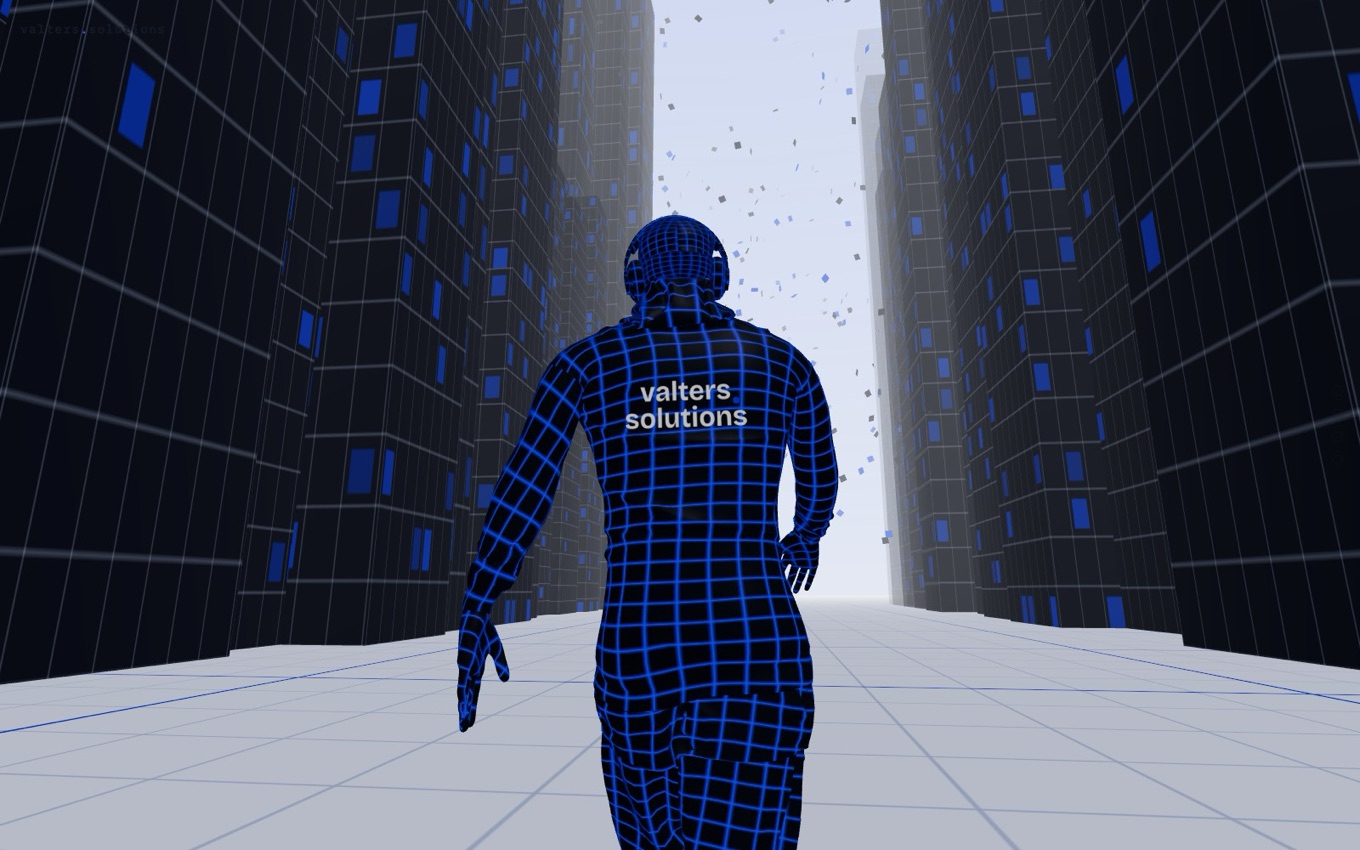
A blue wireframe figure walking into a city of dark towers on a light grid floor, particles rising ahead.
The live scene: a wireframe figure walks into the city as you scroll.
9 min

How to build a scroll-driven 3D web experience

A practical build guide for a scroll-controlled 3D web scene - the stack, the core mechanic, the build order, and the sharp edges to avoid.

3DThree.jsWeb development
Where AI pays off: a map by whether you can check the work and what a mistake costs A two-by-two map. The horizontal axis runs from judgement, where every case differs, to rules-based, clear and repeatable. The vertical axis runs from cheap and visible mistakes at the bottom to costly and silent mistakes at the top. The bottom-right quadrant - rules-based work with cheap, visible mistakes - is highlighted as where AI pays off, with examples: data entry, routing, documents, reports. The other three quadrants read keep a person, automate but verify, and support only. Keep a person Automate, verify Support only AI PAYS OFF data entry · routing documents · reports COSTLY,SILENT CHEAP,VISIBLE JUDGEMENT RULES-BASED mistake can you define and check "correct"?
AI pays off in one corner: rules-based work where a mistake is cheap and easy to spot. Judgement calls and silent, costly errors stay with a person.
5 min

Where AI actually pays off for a small business

An honest guide to where AI is worth it for a small business - repetitive rules-based work and making sense of documents - and where it isn't.

AI advisorySMBAutomation
An AI solutions architect turns a messy business problem into one tool that fits how you work A left-to-right flow. A business problem - spreadsheets, inbox, manual steps - goes to the AI solutions architect, the cobalt node who works out what to build, and out comes one tool that fits exactly how you work. A business problem spreadsheets · inbox · manual AI solutions architect works out what to build One tool that fits exactly how you work
An AI solutions architect takes a messy business problem and turns it into one tool that fits how you actually work.
5 min

What is an AI solutions architect, and when does a business need one?

An AI solutions architect translates a business problem into a working system - deciding what to build and what to never build. Here's when an SMB needs one.

AI solutions architectSMBAI advisory
The sign you have outgrown your tools: four separate tools that do not talk to each other, so you copy between them by hand Four boxes - spreadsheet, SaaS app, inbox, files - sit in a row. The links between them are broken, marked with red crosses, because the tools do not connect. You are the integration, copying between them by hand. Spreadsheet SaaS app Inbox Files Four tools, none of them talk. You are the integration - copying by hand.
The clearest sign you have outgrown spreadsheets and SaaS: nothing connects, so a person copies between them all day.
5 min

Signs your business has outgrown spreadsheets and off-the-shelf SaaS

Practical signs you've outgrown spreadsheets and generic SaaS - copy-paste between tools, workarounds, version chaos - and what a custom tool fixes.

SMBCustom softwareSaaS
With AI a custom tool is live in weeks; the traditional way takes months - shown to the same time scale Two bars over the same span of time. The "with AI" bar is short - a prototype in days, live in weeks. The traditional bar is many times longer - months of spec, build and test. The length difference shows how much faster AI is. WITH AI WEEKS prototype in days · live in weeks THE TRADITIONAL WAY MONTHS months of spec, build and test
Same time scale: AI gets a working tool live in weeks; the old way runs for months. The point is the gap.
4 min

How long does it take to build custom software with AI?

Weeks, not months. A working prototype on your real data within days, then a live production tool. Here's what actually sets the timeline.

Custom softwareTimelineAI
AI dissolves the boundaries between software roles: traditionally each boundary is a handover; with AI one person directs the work across all of them Top row, traditionally: five separate role boxes - product, design, architecture, build, QA - with a handover arrow at every boundary between them. Bottom row, with AI: one continuous cobalt bar spans the same five roles, with the old boundaries shown only as faint dashed lines it crosses, and one person plus AI directing all of it. TRADITIONALLY: A HANDOVER AT EVERY BOUNDARY Product Design Architecture Build QA WITH AI: ONE PERSON DIRECTS IT ALL One person + AI product · design · architecture · build · qa - no handovers
Traditionally, every role boundary is a handover. AI lets one person direct the work across all of them - the boundaries are what dissolve, not the roles.
6 min

Everyone thinks AI will replace someone else

AI is not entering software as another role. It is a shared layer of outsourced thinking across all of them - and it attacks the boundaries between roles, not the roles themselves.

AISoftware deliveryIndustry
The systems model: an input enters a transformation and leaves as an output, governed by controls from above and powered by resources from below A central transformation box. An input arrow enters from the left and an output arrow leaves to the right. A controls arrow points down into the top of the box - the rules and triggers that govern it. A resources arrow points up into the bottom - the people, data and systems that power it. Transformation INPUT OUTPUT CONTROLS - rules, triggers RESOURCES - people, data, systems
Any system is the same shape: an input, a transformation, an output - governed by controls and powered by resources.
6 min

Every business is a system, and reading it is half the build

The simplest, most useful model I know - input, transformation, output - is how I read a business before writing any software, and how I find what's worth building.

Systems thinkingSoftware deliveryCustom software
Own versus rent: with custom software you keep the code, docs and keys; with SaaS you only have access while you pay Two panels. Left, you own it: a solid box holding code, docs and keys, still yours after you stop paying. Right, you rent it: a faint box you only have access to, gone the day you stop paying. YOU OWN IT Your tool code · docs · keys, in your hands Still yours after you stop paying. YOU RENT IT Their tool access only, while you pay a monthly fee Gone the day you stop paying.
Own it and you keep the code, docs and keys for good. Rent it and you only have access while the payments continue.
5 min

Do you own the custom software you pay someone to build?

Yes. When you commission custom software you own it outright - the code, documentation, and keys - on a standard stack with no lock-in, unlike SaaS.

OwnershipCustom softwareSaaS
A one-time custom build versus a SaaS subscription compounding over time One short cobalt bar marks the single up-front cost of a custom tool. Beside it, a rising staircase of faint bars shows a SaaS subscription growing month after month until its running total far overtakes the one-time cost. CUSTOM SAAS, MONTH AFTER MONTH PAID ONCE KEEPS CLIMBING
A custom tool is one line you draw; a subscription is a total that never stops adding up.
5 min

Buy once or rent forever - when a custom tool pays off against SaaS

SaaS is a cost that climbs every month and never stops. A custom tool is paid once. Here's the cost shape, and when owning beats renting.

Custom softwareCostSaaS
Buy versus build: the few SaaS features you actually use, plus the gaps you patch by hand, each copied one-for-one into a single custom tool Left, an off-the-shelf SaaS grid with only a few features used (blue), plus three manual gaps - spreadsheet, scripts, by hand. Seven arrows run one-to-one, each blue thing to its own box, into a single custom tool on the right that holds an exact copy of all seven. BUY: OFF-THE-SHELF SAAS Many features. You use a few. Spreadsheet Scripts By hand + the gaps you patch by hand. BUILD: ONE CUSTOM TOOL Your tool Exactly what you use - gathered in one place.
The scattered few SaaS features you use and the gaps you patch by hand - copied into one tool that is exactly your workflow.
5 min

Build vs buy: when should a small business build its own tool?

A clear decision framework for build vs buy. Buy for commodity needs; build where the workflow is specific to you and off-the-shelf forces workarounds.

Build vs buyCustom softwareSMB
Confidence that you are building the right thing, over time A line chart. Confidence it fits is on the vertical axis, time and work on the horizontal. Trying to spec everything up front keeps confidence flat and low across the whole build, then jumps at ship to an uncertain point - a late gamble. Shipping feature by feature climbs in steps as each piece of feedback confirms fit, reaching high confidence early and holding it, marked green where it fits real use. CONFIDENCE IT FITS TIME · WORK → SPEC EVERYTHING ship - find out FEATURE BY FEATURE fits real use
Try to spec every feature up front and your confidence it fits stays flat until you ship - then it's a gamble. Ship feature by feature and each piece of feedback lifts that confidence early, and holds it.
5 min

Spec the foundations, then iterate the rest

Projects used to fail because the spec wasn't good enough up front. AI lowered the cost of change - so now you spec the foundations that touch everything, and ship the rest feature by feature.

Iterative deliveryCustom softwareFeedback
SaaS rented forever and almost fitting, versus a custom tool owned once and fitting exactly On the left, a tall stack of repeating monthly subscription bars with a notch where the generic tool does not match the workflow shape. On the right, a single solid block, owned outright, whose outline matches the workflow exactly - marked in cobalt. SAAS - RENTED GAP EVERY MONTH · FOREVER CUSTOM - OWNED ONE-TIME BUILD · YOURS EXACT FIT
Rent software that almost fits, forever - or own one built to fit exactly.
6 min

Custom tools vs SaaS subscriptions for small businesses

A plain comparison of buying off-the-shelf software versus owning a tool built for how you actually work - cost, fit, and lock-in.

SaaSCustom softwareSMB
Picking the first workflow to automate A field of candidate tasks plotted by how often they happen and how clear their rules are. Most scatter across the field; one task sits high on both axes, in the fast-payback corner, marked in cobalt as the first pick. HAPPENS OFTEN RULES ARE CLEAR FAST PAYBACK FIRST
The first pick: where frequency meets clear rules.
5 min

What to automate first in a small business

A practical way to pick the first workflow worth automating - the one that pays back fastest without disrupting the team.

AutomationWorkflowSMB
Email copied - valters@valters.solutions